
Getting started
Remote Storage Manager
Connect remote storage accounts and move files between them with a dual-panel browser — 19+ providers, folder operations, and a live transfer history.
Connect Multiple Providers
Works with 19+ cloud storage providers including Dropbox, Google Drive, OneDrive, S3, and more.
Easy File Transfers
Move, copy, and sync files with a simple drag-and-drop interface.
Track Your Activity
View transfer history and monitor progress in real time.
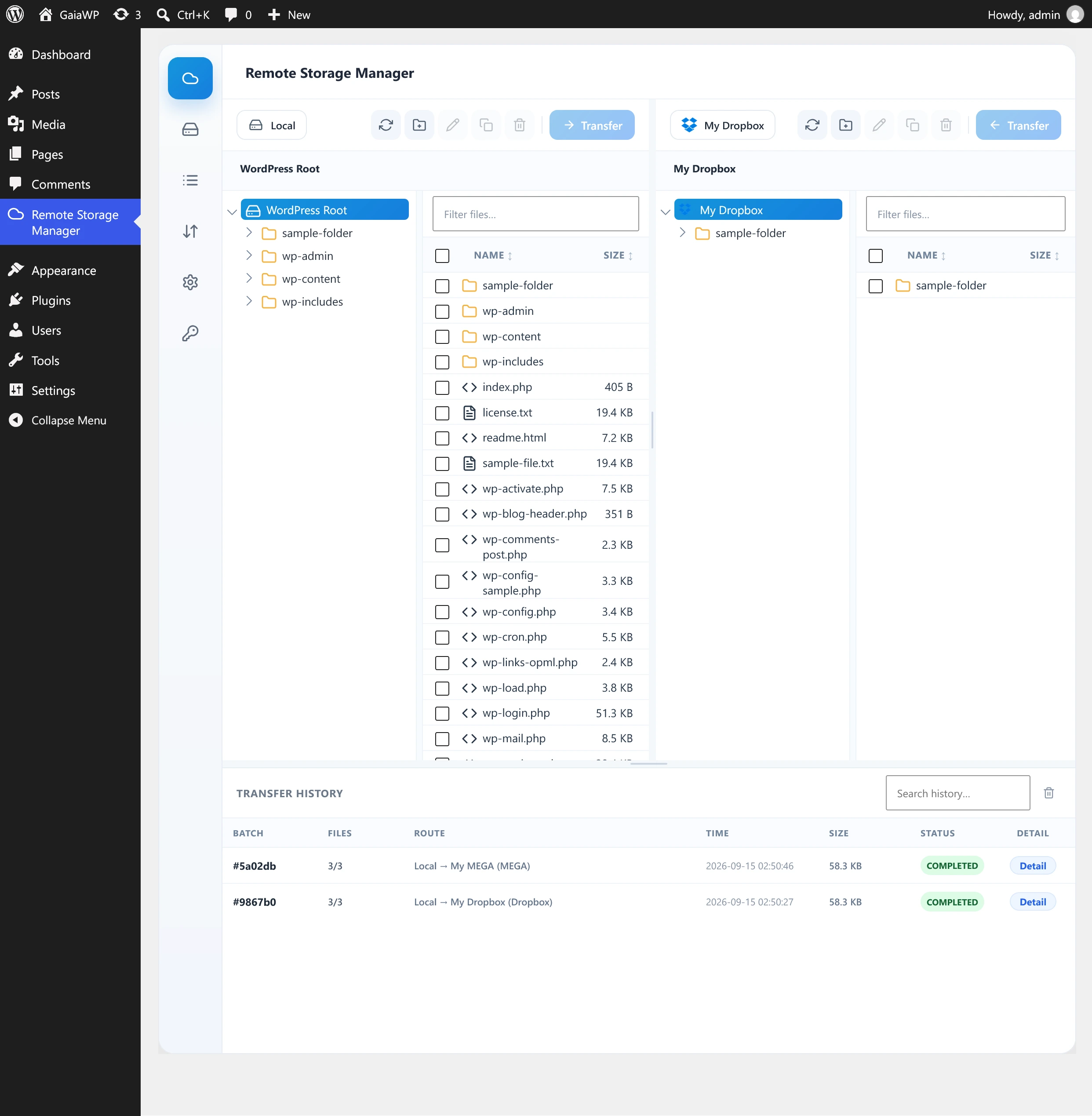
GaiaWP Remote Storage Manager is a focused WordPress admin tool for connecting remote storage accounts and moving files between them. It provides a dual-panel file browser with drag-and-drop transfers, folder operations, and a live transfer history log.
Key features
- Dual-panel file browser — Local WordPress storage on one side, any connected remote account on the other (or remote-to-remote).
- 19+ storage providers — Cloud object storage, consumer clouds, and generic protocols such as SFTP, FTP, and WebDAV.
- Folder transfers — Recursively copy entire folder trees between storages.
- Smart conflict handling — Skip, overwrite, or keep both at the destination, decided before the transfer starts.
- Live progress and history — Per-file progress, speed, ETA, and a searchable batch history with drill-down detail.
- File management — Create folder, rename, duplicate, move, delete, and download directly from the browser.
- Drag and drop — Drag files between panels to start a transfer.
- Activity Log — Optional database-backed log for diagnosing issues, with search, copy, and clear actions.
What's inside
Every section of this manual, in reading order. You can also jump straight to Getting started.
Requirements
WordPress, PHP, memory and execution-time prerequisites.
Read →Installation
Upload the ZIP, activate, and find the new admin menu.
Read →Getting started
The plugin tabs and a typical first run.
Read →Supported providers
19+ object stores, consumer clouds, and protocols.
Read →Connecting an account
OAuth sign-in and credential forms per provider.
Read →Managing accounts
Edit labels, re-authenticate, or remove accounts.
Read →Transfer screen
Dual-panel browser, selection, transfers, conflicts.
Read →Transfer history
Active transfers and completed batch detail.
Read →Activity log
Database-backed diagnostics with search and copy.
Read →Settings
Chunk size, workers, polling, and provider apps.
Read →Troubleshooting
Stalled transfers, large-file failures, re-auth.
Read →FAQ
Direct remote-to-remote, privacy, credentials.
Read →Developer notes
Namespaces, dependencies, REST API, capability.
Read →Quick start
- Open Remote Storage Manager → Accounts.
- Click Add Account and pick a provider.
- Complete the connection (sign-in or credentials).
- Go to the Transfer tab, choose the storage for each panel, and start moving files.